What it is
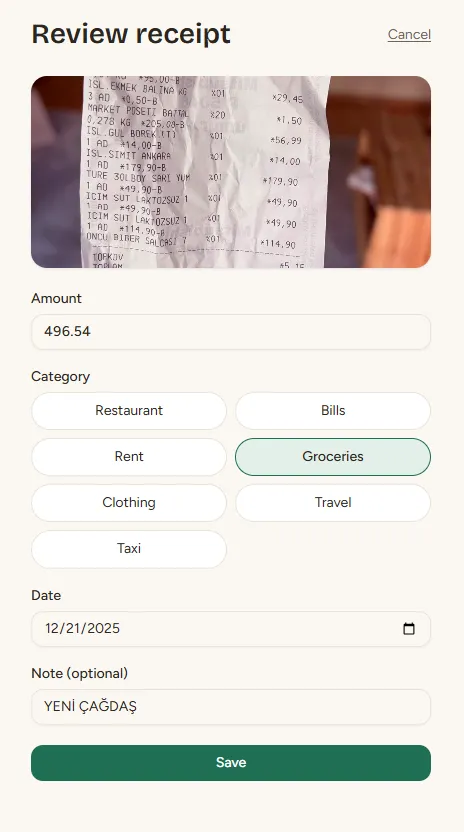
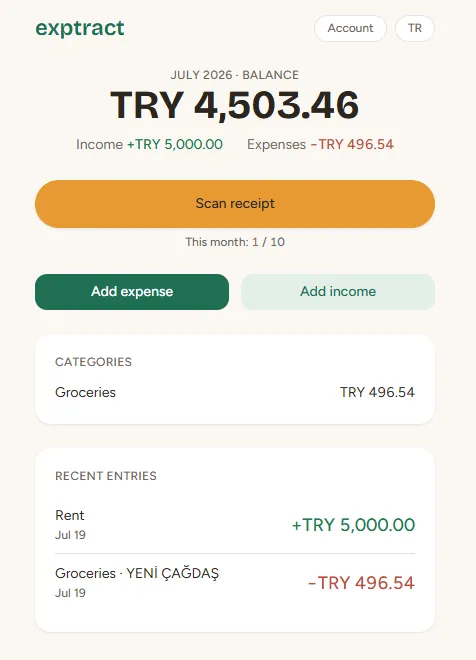
Snap a receipt, get a logged expense. Exptract is an income-and-expense tracker that installs like an app and lives in the browser: you photograph a receipt, a vision model reads the amount, date, merchant, and category, then you glance at the summary and accept. Manual entries follow the same path, and every screen works in both Turkish and English.
I’m a product manager, not an engineer. I built this solo with Claude Code — it wrote the code, I owned every decision: scope, design, security, compliance.
How it works
The front end is a React + Vite PWA. Supabase handles auth, the Postgres database, file storage, and server-side functions, with row-level security on every table. Receipt reading runs on Gemini Flash-Lite, called only from a server-side function — the API key never reaches the browser. AI scans are metered at 10 a month; hitting the cap offers a one-tap waitlist.
The compliance is real rather than decorative. Consent is recorded in a table clients can only read, the bilingual privacy policy describes the actual data flows, and deleting your account erases everything — including stored receipt images, which the database cascade alone wouldn’t reach. Cloudflare Turnstile guards sign-in, and the whole thing deploys on Vercel.
What I learned
Exactly two bugs survived code review across the whole build, and I caught both by using the app: sign-in validation messages showing up in the browser’s language instead of the app’s, and a sign-up that quietly hung when the email already existed. Five minutes of clicking around beat review every single phase.
The debugging low point taught the biggest lesson. The receipt reader failed
five different ways behind one misleading “CORS error” — the function was
actually crashing and returning without the headers that would have told the
truth. At the bottom of the stack, the AI provider’s answer: limit: 0.
Zero free quota for that exact model. Once we made every failure readable,
each layer became a one-line fix.
And compliance is a system, not a checkbox. “Let users delete their data” sounds simple — but the database cascade doesn’t reach stored receipt images, and consent had to live in a tamper-proof table the app can read but never edit.